
How to Activate an eSIM on iPhone and Android – A Simple Guide
After purchasing an eSIM for your trip, the next step is to install and activate it correctly. The process usually takes just a few minutes, and there’s no need to replace your physical SIM card.
Below, we’ll explain how to activate an eSIM on iPhone and Android devices.
How to Activate an eSIM on iPhone
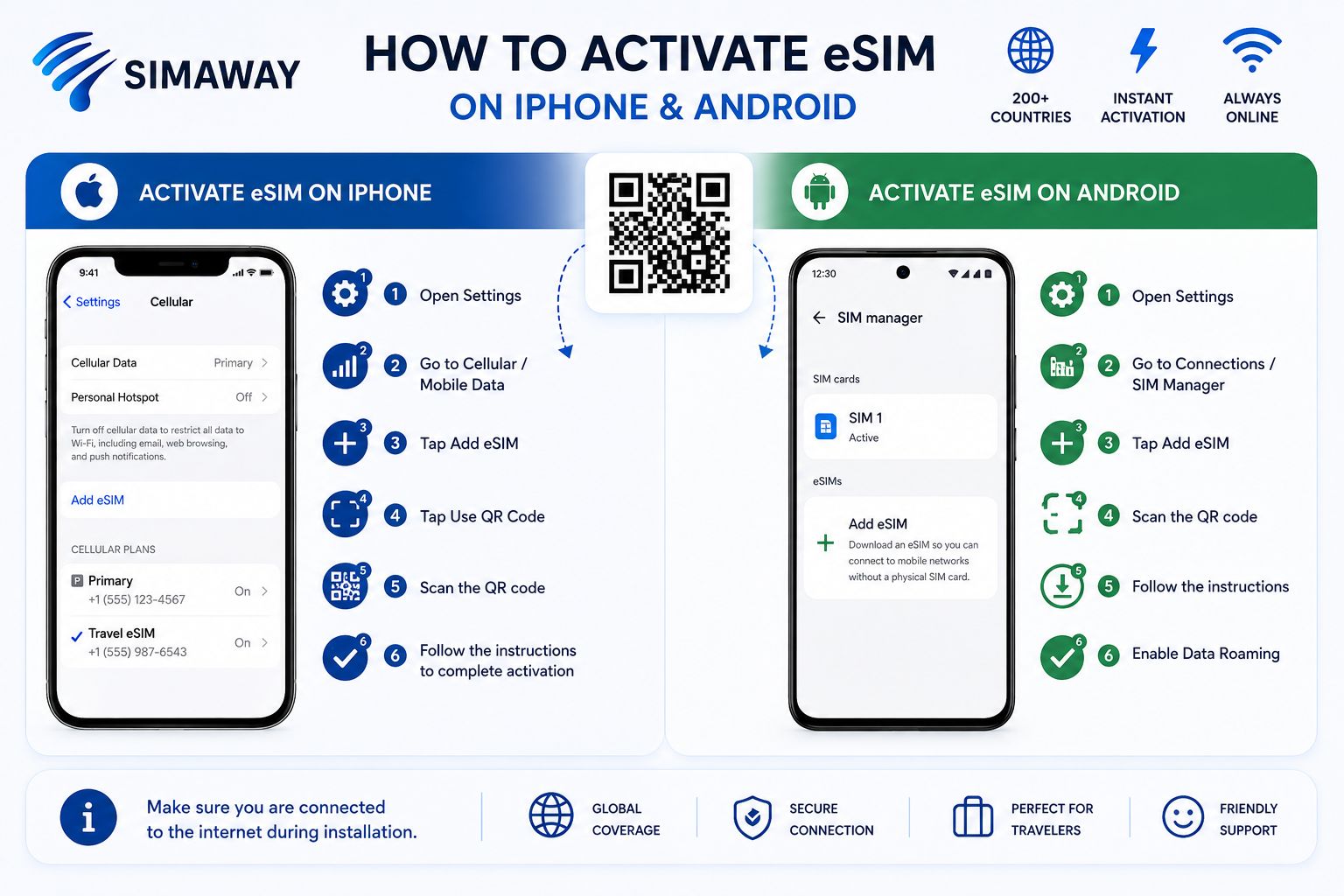
If your iPhone supports eSIM, you can install it using a QR code.
To add an eSIM on iPhone:
Open Settings
Go to Cellular / Mobile Data
Select Add eSIM
Tap Use QR Code
Scan the eSIM QR code you received
Follow the on-screen instructions to complete the installation
Once the eSIM is installed, select it for mobile data and enable Data Roaming.
📌 Make sure your iPhone is connected to the internet while installing the eSIM.
How to Activate an eSIM on Android
The exact menu may vary depending on your Android phone manufacturer and model.
For example, on Samsung Galaxy devices, you can usually go to:
Settings → Connections → SIM Manager → Add eSIM
Then:
Choose the option to add an eSIM using a QR code.
Scan the eSIM QR code you received.
Wait for the installation to complete.
Select the new eSIM for mobile data.
Enable Data Roaming.
On Google Pixel and other Android devices, the menu names may be slightly different, but the process is similar. Look for the option to add a SIM or eSIM in your mobile network settings.
When Should You Install Your eSIM?
You can install your eSIM before your trip while you still have access to a stable internet connection.
Preparing your eSIM in advance makes traveling easier. Once you arrive at your destination, you won’t need to search for a local SIM card and can get connected much faster.
What If Your eSIM Is Installed but the Internet Doesn’t Work?
First, check that:
Your eSIM is turned on.
The eSIM is selected for mobile data.
Data Roaming is enabled.
The correct APN is configured if required.
Try turning Airplane Mode on and off or restarting your phone.
SIMAWAY eSIM – Travel Internet in Minutes
With SIMAWAY, you can choose your travel internet plan in advance, receive your eSIM, and prepare your phone before your trip.
🌍 Available in 200+ countries
⚡ Fast activation
♾️ Limited and unlimited data plans
Choose your destination, select the right data plan, and prepare your eSIM before you travel.